
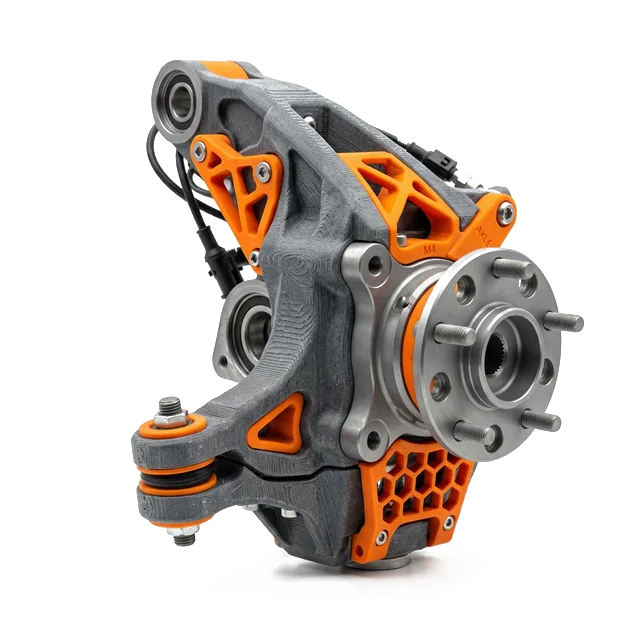

Rapid Prototyping & 3D Printing: Everything You Need to Know
Rapid prototyping means making a real part from your design — fast. You send a CAD file. You get a part you can hold and test.
There are two main ways to do it. CNC machining cuts metal or plastic into shape. 3D printing builds it up layer by layer.
Both work. The right choice depends on your part, your timeline, and your goal. This guide helps you pick.
Your prototype method matters. A lot. If your part will go to production, pick the method that matches how you'll actually make it. A 3D print can check a concept. But only a CNC prototype proves your design works in real metal at real tolerances.
What Is Rapid Prototyping?
Rapid prototyping is a way to make a physical part from a digital design — fast. Instead of waiting weeks for tooling, you get a real part in days.
The idea started in the 1980s with the first 3D printers. Today, engineers use two main methods:
- CNC machining — a computer-controlled cutter removes material from a solid block. You get a part made from real metal or engineering plastic — aluminum (6061, 7075), steel (1018, 4140), stainless steel (304, 316), titanium (Ti-6Al-4V), brass 360, copper C110, Delrin, PEEK, and more.
- 3D printing — a machine builds your part layer by layer from thermoplastic (PLA, ABS, nylon, PETG, TPU), resin, or metal powder.
Both can make a prototype in 1–5 days. The difference is what the prototype is made of — and whether it works like the real thing.
8 Types of Rapid Prototyping Methods
There are several ways to make a prototype. Here are the 8 most common methods, from fastest to most precise.
- FDM 3D Printing — melts plastic filament layer by layer. Materials: PLA, ABS, ASA, nylon (PA6, PA12), PETG, TPU (flexible), polycarbonate, carbon-fiber nylon, and glass-filled nylon. Cheapest option ($10–$50/part). Best for quick concept checks.
- SLA 3D Printing — uses UV light to cure liquid resin. Materials: standard resin, tough resin (ABS-like), flexible resin (rubber-like), castable resin (for investment casting), dental resin, and high-temp resin. Smoother than FDM ($20–$80/part). Great for detailed visual models.
- SLS 3D Printing — fuses nylon powder with a laser. Materials: PA12 (nylon 12), PA11 (nylon 11), glass-filled nylon, and TPU. Strong plastic parts ($30–$100/part). Good for functional plastic prototypes.
- CNC Milling — cuts your part from a solid block. Works with 50+ materials: aluminum (6061, 7075, 2024), steel (1018, 4140, 4340), stainless steel (303, 304, 316, 17-4 PH), titanium (Ti-6Al-4V), brass 360, copper C110, and plastics like Delrin, PEEK, nylon 6/6, and polycarbonate. Best for functional testing. $65–$500/part.
- CNC Turning — spins your part on a lathe and cuts it in aluminum 6061, stainless steel (303, 304, 316), brass 360, or steel (1018, 4140). Perfect for round parts like shafts, pins, and bushings.
- DMLS Metal 3D Printing — fuses metal powder with a laser. Materials: titanium Ti-6Al-4V, stainless 316L, stainless 17-4 PH, Inconel 718, Inconel 625, AlSi10Mg (aluminum), cobalt-chrome (CoCr), and maraging steel. Complex metal shapes ($200–$800/part). Needs post-machining for tight tolerances.
- Vacuum Casting — makes silicone molds from a master part. Good for 10–50 plastic copies. Takes 5–10 days.
- Sheet Metal Prototyping — bends and cuts flat metal sheets. Fast for brackets, enclosures, and panels.
At RivCut, we specialize in CNC milling and turning. These methods give you the tightest tolerances (±0.001") and the widest material selection (50+ metals and plastics).
CNC vs 3D Printing: Side-by-Side Comparison
Here's how the four most common prototyping methods stack up. This is the most-used table on the page.
| Feature | CNC Machining | FDM 3D Printing | SLA 3D Printing | Metal 3D Printing (DMLS) |
|---|---|---|---|---|
| Tolerance | ±0.001"–0.005" | ±0.010"–0.020" | ±0.005" | ±0.005"–0.010" |
| Materials | 50+ including aluminum 6061/7075, stainless 304/316, titanium Ti-6Al-4V, Delrin, PEEK | PLA, ABS, nylon, PETG, TPU | Standard, tough, flexible, castable resins | Ti-6Al-4V, SS 316L, Inconel 718, AlSi10Mg |
| Surface Finish | 32–125 Ra | 200–400 Ra | 50–100 Ra | 150–300 Ra |
| Lead Time | 1–5 days | Hours–2 days | Hours–2 days | 5–10 days |
| Cost (simple part) | $65–$200 | $10–$50 | $20–$80 | $200–$800 |
| Strength | Production-grade | 60–80% of injection | Brittle (most resins) | 90–95% of wrought |
| Min Quantity | 1 piece | 1 piece | 1 piece | 1 piece |
| Best For | Functional testing & production validation | Visual models & form checks | Detailed models & fine features | Complex metal geometries |
| Post-Processing | Minimal — ready to use | Support removal, sanding | Washing, UV curing | Support removal, heat treat, machining |
| Scales to Production? | Yes — same process | No | No | Limited |
Key takeaway: CNC costs more per part than FDM or SLA. But it's the only method that makes prototypes from real production materials at real tolerances. If your part needs to work like the final product, pick CNC. If you just need a cheap shape to check size, 3D printing is faster and cheaper.
When to Choose CNC Machining for Prototyping
Pick CNC when your prototype needs to do more than just look right. Here are five times CNC is the clear winner.
1 Functional Testing with Real Materials
You need to test strength, heat, or wear. A PLA 3D print can't act like aluminum 6061 or stainless 316 under load. CNC uses the same material as your production part. So your test results are real. This matters for brackets, motor mounts, heatsinks, and any part that takes stress.
2 Tight Tolerances and Precision Fits
Your design has press fits, bearing holes, or mating surfaces. These need ±0.001" to ±0.005" accuracy. FDM can only hold ±0.010"–0.020". If a 3D print doesn't fit, you won't know if it's the design or the printing. CNC removes that guesswork.
3 Metal Parts of Any Kind
If your final part is aluminum (6061, 7075), steel (1018, 4140), stainless steel (304, 316), titanium (Ti-6Al-4V), brass 360, or copper C110 — prototype it in the same metal. CNC machines these easily. Metal 3D printing (DMLS) costs 3–5x more and needs extra finishing work. A $150 CNC prototype beats a $500 DMLS print that still needs machining.
4 Prototype-to-Production Validation
Your part will be CNC machined in production. So prototype it with CNC too. You'll test the design and the process at the same time. When you scale from 1 to 500 pieces, nothing changes. Same machines, same toolpaths, same results.
5 Surface Finish and Appearance
CNC parts come off the machine at 32 Ra — smooth enough for O-ring seals. Add anodizing or bead blasting and they look like finished products. FDM layer lines (200–400 Ra) are rough and visible. SLA is smoother but still can't match CNC.
Need a Functional Prototype in Real Metal?
Upload your CAD file and get a quote within hours. CNC prototypes ship in as few as 3 business days.
Upload CAD for Instant QuoteWhen to Choose 3D Printing for Prototyping
3D printing isn't a replacement for CNC. It's a partner. Here are five times when 3D printing is the smarter pick.
1 Early-Stage Concept Validation
You're in the first round of design. You just need to check size, shape, and feel. At $10–$50 per FDM print in PLA or ABS, you can test 5 designs for the price of one CNC part. These don't need to be strong. They just need to exist so your team can hold them and spot problems early.
2 Complex Organic Geometries
Lattice shapes, internal channels, and freeform surfaces are hard or impossible to CNC. 3D printing builds these shapes layer by layer with no tool access limits. If your design came from generative design software, 3D printing may be the only way to prototype it.
3 Same-Day Turnaround
You need a part by tomorrow. A desktop 3D printer can make it in hours. CNC shops need 1–5 business days even on rush. If speed matters more than strength or precision, 3D printing wins. Just know the part will be weaker, less accurate, and made of plastic.
4 Very Small or Intricate Parts
Parts with features under 0.5mm or thin walls are tough for CNC. The cutting tools can't reach tight spots. SLA 3D printing can handle details as small as 0.1mm. It's great for tiny connectors, micro channels, and dental models.
5 Budget-Constrained Exploration
You're a student, startup founder, or researcher with a tight budget. At $10–$50 per PLA print, you can do 10+ design rounds before investing in CNC. Many great hardware products started as cheap 3D prints before moving to CNC for real testing.
The Hybrid Approach: 3D Print First, Then CNC
The smartest plan isn't CNC or 3D printing. It's both — used at the right time. Start cheap. Finish strong.
-
Step 1: Concept Check with FDM ($10–$50/part)
Print your first design in PLA or ABS. Check the size, shape, and how it feels in hand. Show it to your team. Get feedback. This is the cheapest way to catch big problems early. Don't worry about strength yet.
-
Step 2: Iterate on Form with SLA ($20–$80/part)
Once the basic shape is locked, print a nicer version in SLA resin (standard, tough, or flexible). SLA gives smoother surfaces and finer details. Use it for investor demos, user tests, and packaging fit checks.
-
Step 3: Functional Validation with CNC ($65–$500/part)
Now machine the design in the real production material — aluminum 6061, stainless 304, or titanium Ti-6Al-4V. This is where you test what matters: strength, heat, tolerances, and fit. Drop it. Heat it. Bolt it to your assembly. This prototype decides if you're ready for production.
-
Step 4: Final Iteration and DFM Review
Make final design tweaks based on testing. RivCut gives free DFM (design for manufacturability) feedback on every upload. We'll flag hard-to-machine features and suggest ways to cut cost without hurting function.
-
Step 5: Scale to Production
Your CNC prototype used the same machines and toolpaths as production. So scaling is easy. Order 10, 100, or 5,000 parts. No new tooling. No new supplier. Same quality because it's the same process.
This is how the best hardware teams work. They spend $50–$150 on 3D prints early. Then they invest $150–$500 in a CNC prototype that doubles as production validation. Total cost: $200–$650. Time saved by avoiding bad designs: weeks to months.
Ready to Move from 3D Print to Production-Grade CNC?
Upload your CAD file. We will quote it, review the DFM, and deliver a real prototype in days — not weeks.
Get an Instant QuoteIndustries That Use Rapid Prototyping
Almost every industry uses prototyping. Here's how different teams use it.
Aerospace
Flight brackets, avionics housings, and engine mounts. These parts need real metal and tight tolerances. CNC is the go-to method.
Medical Devices
Surgical tools, implant components, and diagnostic housings. Medical prototypes need biocompatible materials like titanium (Ti-6Al-4V) and stainless 316L.
Automotive
Engine parts, suspension brackets, and EV battery enclosures. Auto teams test fit and function with CNC prototypes in aluminum 6061 and steel 4140.
Robotics
Robot arm links, gripper fingers, and sensor mounts. Robotics startups iterate fast — often 3–5 prototype rounds before production.
Consumer Electronics
Phone cases, heatsinks, and wearable housings. Teams start with 3D prints for look and feel, then switch to CNC for drop tests.
Hardware Startups
MVP parts, demo units, and investor samples. Startups need 1–10 pieces fast. No long-term contracts.
Real Rapid Prototyping Examples
Here's how real teams use prototyping to ship better products.
Drone Startup — Motor Mount
A drone company needed to test a new motor mount design. They 3D printed 3 versions in PLA to check fit ($30 total). Then they CNC machined the winner in 7075 aluminum ($180). The CNC part weighed 40% less than their old design and passed vibration testing on the first try.
Medical Device — Surgical Guide
A medical team designed a custom surgical guide. They printed an SLA model to check geometry ($60). Then they machined it in stainless 316L ($350) with ±0.001" tolerances. The CNC version went straight to sterilization testing.
EV Startup — Battery Enclosure
An electric vehicle startup needed a battery enclosure prototype. 3D printing wasn't an option — the part had to survive crash testing. They CNC machined it in 6061-T6 aluminum ($420). It passed 3 rounds of impact testing without modification.
How Much Does Rapid Prototyping Cost?
Nobody else publishes real prices. We do. Here's what prototypes actually cost.
| Part Complexity | FDM 3D Print | SLA 3D Print | CNC Machined | Metal 3D Print |
|---|---|---|---|---|
| Simple (1 setup, no tight tolerances) | $10–$30 | $20–$50 | $65–$150 | $200–$400 |
| Moderate (2 setups, some tight features) | $30–$80 | $50–$120 | $150–$350 | $400–$700 |
| Complex (3+ setups, tight tolerances) | $50–$150 | $80–$200 | $350–$800 | $700–$1,500 |
| Very Complex (5-axis, exotic material) | N/A | N/A | $800–$2,000+ | $1,500–$3,000+ |
Key point: CNC costs more per part than FDM. But you get a part made from real metal that actually works. A $150 CNC prototype can save you $10,000 in failed production parts.
Material Strength: CNC vs 3D Printing
This is the table nobody else shows you. How strong are 3D printed parts compared to CNC machined parts?
| Property | CNC Aluminum 6061 | FDM PLA | SLA Tough Resin | DMLS AlSi10Mg | Stainless 316 | Titanium Ti-6Al-4V | PEEK | Nylon PA12 (SLS) |
|---|---|---|---|---|---|---|---|---|
| Tensile Strength | 45,000 psi | 7,250 psi | 8,000 psi | 40,000 psi | 75,000 psi | 130,000 psi | 16,000 psi | 7,000 psi |
| Heat Resistance | 300°F+ | 140°F | 120°F | 300°F+ | 800°F+ | 600°F | 480°F | 350°F |
| Surface Finish | 32–125 Ra | 200–400 Ra | 50–100 Ra | 150–300 Ra | 32–125 Ra | 63–125 Ra | 32–125 Ra | 150–250 Ra |
| Tolerance | ±0.001" | ±0.010" | ±0.005" | ±0.005" | ±0.001" | ±0.001" | ±0.002" | ±0.005" |
| Cost per in³ | $0.40 | $0.05 | $0.15 | $5.00 | $1.20 | $5.00 | $28.00 | $0.20 |
| Usable in Production? | Yes | Rarely | No | Sometimes | Yes | Yes | Yes | Limited |
CNC aluminum is 6x stronger than FDM plastic. It handles 2x the heat. And it's the same material you'll use in production. That's why serious prototyping uses CNC.
Rapid Prototyping Materials Comparison
Material choice is the biggest gap between CNC and 3D printing. CNC works with every production metal and engineering plastic. 3D printing is limited to basic plastics and resins, plus some expensive metal options.
| Material | CNC Machining | FDM | SLA | DMLS |
|---|---|---|---|---|
| Aluminum 6061 | Yes — most popular | No | No | AlSi10Mg (similar) |
| Aluminum 7075 | Yes | No | No | No |
| Stainless 303/304/316 | Yes | No | No | 316L, 17-4 PH |
| Titanium Grade 5 | Yes | No | No | Ti6Al4V |
| Carbon Steel 1018/4140 | Yes | No | No | Limited |
| Brass / Copper | Yes | No | No | Limited |
| Inconel 625/718 | Yes | No | No | Yes |
| Delrin (Acetal) | Yes | No | No | No |
| PEEK | Yes | Limited (special printers) | No | No |
| Polycarbonate | Yes | Yes | No | No |
| Nylon | Yes | Yes | No | PA12 (SLS) |
| ABS | Yes | Yes | ABS-like resin | No |
| PLA | Not typical | Yes — most common | No | No |
| Flexible / TPU | Not typical | Yes | Flexible resin | No |
| Steel 1018 | Yes | No | No | No |
| Steel 4140 | Yes | No | No | No |
| Steel 4340 | Yes | No | No | Maraging (similar) |
| Stainless 303 | Yes — free-machining | No | No | No |
| Stainless 17-4 PH | Yes | No | No | Yes |
| Brass 360 | Yes — 100% machinability | No | No | No |
| Copper C110 | Yes | No | No | CuCrZr (limited) |
| Inconel 718 | Yes — difficult | No | No | Yes |
| UHMW-PE | Yes | No | No | No |
| Acrylic (PMMA) | Yes | No | No | No |
| PTFE (Teflon) | Yes | No | No | No |
| Garolite G-10 | Yes | No | No | No |
| Ultem (PEI) | Yes | Limited | No | No |
| Magnesium AZ31B | Yes — fire risk | No | No | No |
| Cobalt-Chrome | Yes — difficult | No | No | Yes |
This material gap is why CNC wins for functional testing. If your production part is aluminum 6061, no 3D print can copy its heat transfer (167 W/mK) or stiffness (69 GPa). You can print a plastic shape that looks similar. But it won't act the same under load, heat, or vibration.
For engineering plastics like Delrin, PEEK, and Ultem, CNC is often the only option. You can't 3D print these with real production properties. CNC machines them cleanly and accurately.
Rapid Prototyping for Startups
If you're a hardware startup, prototyping is everything. You need to move fast, stay on budget, and make parts that impress investors — while still being good enough to move toward production.
Here's the playbook most successful startups follow:
- Seed stage: 3D print in PLA or ABS for form checks and pitch photos. Budget: $50–$200 for 5–10 tries.
- Pre-seed to Series A: CNC machine 1–3 prototypes in aluminum 6061 or stainless 316 for demos and testing. Budget: $200–$1,000. They look real because they are real.
- Post-funding: CNC machine 10–50 parts for beta testing and regulatory submissions. Same shop, same quality. Budget: $1,000–$5,000.
- Production: Scale to 100–5,000+ parts. No new tooling needed.
RivCut works with startups every day. We sign NDAs before seeing your files. Free DFM reviews that catch expensive mistakes early. Many startups go from first prototype to production without switching shops.
Metal Rapid Prototyping Options
Need a metal prototype? You have two choices: CNC machining or metal 3D printing (DMLS).
CNC machining is the go-to for metal prototypes. It works with all standard alloys — aluminum 6061, 7075, stainless 303/304/316, titanium (Ti-6Al-4V), brass 360, and copper C110. Surface finish reaches 32 Ra. Tolerances hold ±0.001". Parts are ready to use right off the machine. Cost: $65–$500 per part.
Metal 3D printing (DMLS) is a niche option for shapes that can't be machined — like internal channels and lattice structures. The downsides are big: 3–5x higher cost ($200–$800+), longer lead times (5–10 days), and required post-processing.
Our advice: Start with CNC for every metal prototype unless the shape literally can't be machined. If you need DMLS for one feature, we can do a hybrid — DMLS for the complex part, CNC for the mating surfaces.
Common Misconceptions About Rapid Prototyping
"3D printing is always cheaper than CNC"
For simple plastic models under $50, yes. But think bigger. A 3D print that fails real testing wastes 1–2 weeks. A CNC prototype that passes testing saves that time. When you look at cost per useful test, CNC often wins.
"3D printing is always faster than CNC"
Print time is fast. But total time to a usable part? Closer than you'd think. A complex FDM print takes 8–24 hours, plus sanding and cleanup. A CNC part machines in 30 minutes to 4 hours and ships ready to use. If you're ordering from a service, both take 3–5 days.
"You can 3D print anything"
3D printing has more shape freedom than CNC. But it has limits too. Overhangs need supports that leave marks. Big flat surfaces warp. Thin walls break. Most 3D print materials melt at low temps. The "print anything" story ignores what happens when your part needs to actually work.
"CNC is only for high-volume production"
That was true 20 years ago. Not anymore. We machine one prototype as happily as 5,000 production parts. A single aluminum 6061 prototype starts at $65. That's close to what you'd pay for a high-quality 3D print.
"All rapid prototyping is the same"
Rapid prototyping is a category, not one process. CNC, FDM, SLA, SLS, DMLS, and sheet metal are all "rapid prototyping." The strength, accuracy, finish, and cost are wildly different between them. Picking the wrong method is one of the most common and costly mistakes in product development.
Rapid Prototyping & 3D Printing: Common Questions
Related Resources
Want to go deeper? Check out these related pages.
Get Your Prototype Quote in Hours
Upload your CAD file for an instant quote on CNC prototypes. One part or fifty. Rush delivery in as few as 3 days.
Free DFM review · NDA ready · Ships anywhere in the US